
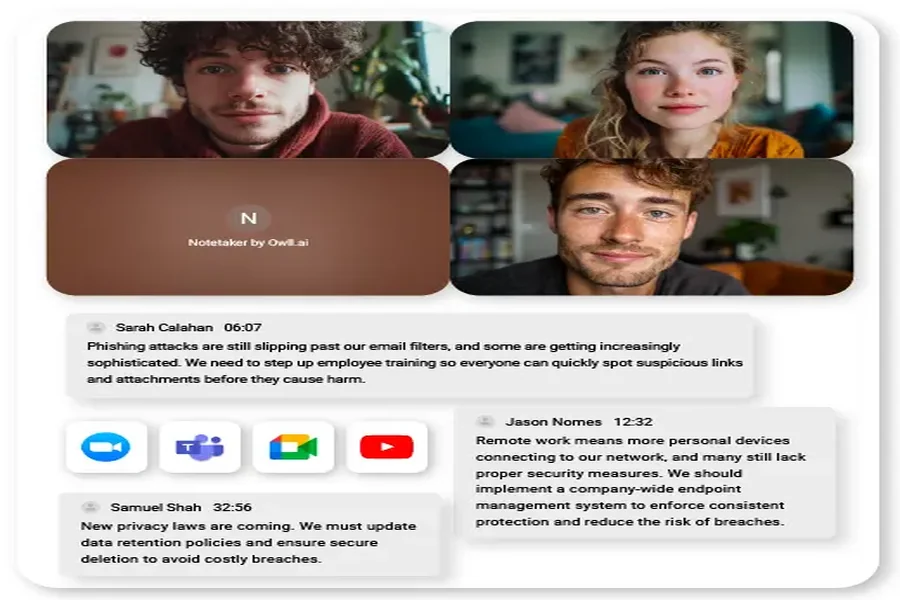

Corporate training teams waste an average of 12 hours per week manually transcribing video content and creating documentation from recorded sessions. Training coordinators struggle to convert webinars into searchable resources, while L&D professionals spend countless hours rewatching presentations to extract key points for employee handbooks. The inefficiency doesn’t stop there—inconsistent note-taking across teams leads to fragmented knowledge bases and compliance gaps that put organizations at risk. AI video summarizers are transforming this landscape by automating transcription and content extraction with remarkable precision. These intelligent tools process hours of training footage in minutes, generating accurate transcripts, condensed summaries, and interactive documents that integrate seamlessly with existing learning management systems. Whether you’re a training manager drowning in video content, an HR professional preparing onboarding materials, or a consultant documenting client presentations, AI-powered solutions deliver instant processing, multi-language support, and collaborative features that revolutionize how professionals create and distribute training materials.
The Training Transcript Crisis: Why Professionals Need AI Solutions
Consider the training coordinator who spends every Friday afternoon rewatching Tuesday’s product launch webinar, pausing every few seconds to type out what speakers said. Or the compliance officer who must verify that safety training videos contain specific regulatory language, manually scrubbing through footage to find exact timestamps. These scenarios play out in organizations daily, consuming resources that could drive strategic initiatives. Research shows that creating a single hour of training documentation from video content requires approximately 4-6 hours of manual work, with accuracy rates dropping below 85% when transcribers handle technical terminology or multiple speakers. This inefficiency compounds across departments—sales teams can’t quickly reference recorded demos, HR struggles to update onboarding materials from evolving presentations, and consultants miss billable hours transcribing client sessions. The consistency problem proves equally damaging. When five team members take notes from the same training video, organizations end up with five different interpretations, creating confusion in knowledge bases and potential compliance vulnerabilities. Professionals need solutions that eliminate these bottlenecks while maintaining the precision required for regulatory documentation, client deliverables, and standardized training programs that scale across global operations.
What is an AI Video Summarizer? (Beyond Basic Transcription)
AI video summarizers represent a significant evolution beyond traditional speech-to-text tools that simply convert audio into written words. While conventional transcription services produce verbatim text requiring extensive manual editing, AI-powered summarizers employ natural language processing and machine learning algorithms to understand context, identify key concepts, and extract meaningful insights from video content. These systems analyze speaker intent, recognize topic transitions, and distinguish between critical information and conversational filler. The technology produces multiple output formats tailored to professional needs—condensed executive summaries highlighting main takeaways, timestamped interactive transcripts that link text to specific video moments, and structured documents organized by themes rather than chronological speech patterns. This capability to summarize videos instantly transforms how organizations handle knowledge transfer. A two-hour leadership training session becomes a searchable transcript with automatically generated chapter markers, a three-paragraph summary for quick reference, and clickable timestamps that let viewers jump directly to relevant segments. The distinction matters because professionals don’t just need words on a page—they need actionable documentation that integrates with learning systems, supports compliance audits, and enables team members to find specific information without watching entire recordings.
Transform Training Workflows: 3 Key Benefits for Professionals
Instant Accurate Transcripts for Training Materials
Manual transcription introduces errors that cascade through training programs—misspelled technical terms, missed safety instructions, and incorrect timestamps that render documentation unreliable. AI video summarizers eliminate these risks by processing audio with accuracy rates exceeding 95%, even when handling industry jargon, acronyms, and multiple speakers with varying accents. The technology automatically formats output for direct integration with learning management systems, generating SRT files for captioning, DOCX documents for editing, and structured JSON data that populates course modules without reformatting. A pharmaceutical company reduced compliance training documentation time from three days to forty minutes by using AI transcription to create validated scripts from recorded sessions, ensuring every regulatory term appeared exactly as spoken and maintaining audit trails that link transcript segments to source video timestamps.
Condensing Lengthy Presentations in Minutes
The ability to quickly summarize presentations transforms how professionals share knowledge across organizations. AI summarizers analyze two-hour conference presentations and extract core concepts into digestible three-paragraph summaries, complete with bullet-pointed action items and key statistics that stakeholders need without watching full recordings. These condensed versions export to PDF for client reports or embed directly into email updates, maintaining professional formatting that requires no additional design work. A consulting firm now delivers same-day meeting recaps to clients by processing recorded strategy sessions through AI summarization, generating executive briefs that highlight decisions, assign responsibilities, and reference specific discussion moments through embedded timestamps—work that previously required junior consultants to spend entire evenings reviewing footage and drafting reports.
Multi-Language Support for Global Teams
Organizations with international operations face compounded transcription challenges when training materials must serve teams speaking different languages. AI video summarizers address this through integrated translation capabilities that convert English training videos into accurate Spanish, Mandarin, or German transcripts while preserving technical terminology and maintaining synchronization with original timestamps. This functionality extends beyond corporate content—professionals can translate YouTube videos containing industry conferences or vendor demonstrations into their team’s preferred language, creating accessible resources from previously language-locked content. A technology company standardized global onboarding by processing English headquarters training through AI translation, producing synchronized transcripts in twelve languages that maintained consistent messaging across regions while reducing localization costs by 70% compared to hiring human translators for each market.
Step-by-Step: Create Training Transcripts with AI Summarizers
Step 1: Source Preparation and Upload
Begin by gathering your training videos in compatible formats—most AI summarizers accept MP4, MOV, AVI files, or direct YouTube links for web-based content. For recorded webinars stored locally, ensure file sizes remain under platform limits (typically 2-5GB) or use compression tools to reduce without sacrificing audio quality, as clear speech input directly impacts transcription accuracy. When processing multiple training sessions, leverage batch upload capabilities that allow simultaneous processing of up to twenty videos, saving the repetitive work of individual submissions. Simply drag files into the upload interface or paste YouTube URLs for public training content like industry conferences or vendor tutorials. The system queues videos automatically, processing them sequentially while you continue other work. For recurring training series, create dedicated project folders within the platform to organize transcripts by department, quarter, or training topic, establishing a structured knowledge base that team members can reference long after initial sessions conclude.
Step 2: Customizing Output Parameters
Before generating transcripts, configure settings to match your documentation requirements. Select summary length based on intended use—brief mode produces three-to-five sentence overviews suitable for email updates, while detailed mode generates comprehensive paragraph summaries with supporting points for training manuals. Enable speaker identification when processing panel discussions or multi-trainer sessions, allowing the AI to distinguish voices and label transcript segments by speaker name or role, which proves essential for attributing specific instructions to qualified personnel in compliance documentation. Activate timestamp inclusion to create interactive transcripts where each sentence links to its corresponding video moment, enabling learners to click any line and jump directly to that segment for clarification. For technical training containing specialized vocabulary, upload custom glossaries with industry acronyms, product names, or regulatory terms to improve recognition accuracy and ensure consistent spelling throughout documentation that meets professional standards.
Step 3: Generating & Editing Interactive Transcripts
Once processing completes, access your interactive transcripts through the platform’s editor interface, where full text appears alongside synchronized video playback. Navigate content by searching keywords—typing “safety protocol” instantly highlights every mention with timestamps, letting you verify coverage without manual review. Edit directly within the transcript panel to correct any misrecognized terms or add clarifying notes, with changes saving automatically and maintaining timestamp synchronization. The interactive format transforms static text into dynamic learning tools: clicking any sentence cues the video to that exact moment, while hovering over technical terms can reveal definitions you’ve added through annotation features. Export options accommodate various workflow needs—download as Word documents for further editing and formatting, generate SRT caption files for video accessibility compliance, or produce PDF reports with embedded timestamps for client deliverables. For team collaboration, share transcript links that allow colleagues to comment on specific sections, suggest edits, or bookmark critical moments, centralizing feedback without version control confusion across multiple document copies.
Advanced Features: Maximizing Professional Efficiency
Modern AI video summarizers extend beyond basic transcription through intelligent features that amplify professional productivity. Automated chapter segmentation analyzes content flow to divide lengthy training videos into logical sections with descriptive titles—a three-hour compliance workshop automatically breaks into “Regulatory Overview,” “Implementation Requirements,” and “Audit Procedures” segments, each accessible through clickable navigation that eliminates manual scrubbing. Custom vocabulary libraries allow professionals to upload industry-specific term databases, ensuring AI recognizes pharmaceutical compound names, financial regulations, or engineering specifications with precision that generic models can’t match. Integration capabilities connect summarizers directly with collaboration platforms like Microsoft Teams and Slack, enabling automatic posting of completed transcripts to designated channels where team members receive notifications and access content without leaving their workflow environments. Interactive transcripts collaboration features transform individual documentation into team knowledge assets—colleagues annotate sections with implementation notes, tag specific teammates for follow-up on action items, and create threaded discussions anchored to exact video timestamps. A financial services firm reduced training question volume by 40% after implementing collaborative transcripts where experienced advisors annotated onboarding videos with clarifying examples, building institutional knowledge that new hires accessed alongside standard content. These advanced capabilities convert AI summarizers from simple transcription tools into comprehensive knowledge management platforms that capture, organize, and distribute training intelligence across entire organizations.
Choosing Your AI Summarizer: 5 Critical Evaluation Factors
Selecting the right AI video summarizer requires evaluating capabilities against your organization’s specific requirements. Accuracy benchmarks should exceed 95% for general business content, with vendors providing sample transcripts from your industry to verify performance with technical terminology—request test processing of your actual training videos before committing to annual contracts. Security compliance proves non-negotiable for organizations handling sensitive content, requiring SOC 2 Type II certification for data handling practices and GDPR compliance for European operations, with clear data retention policies that specify when uploaded videos are permanently deleted from vendor servers. Integration depth determines workflow efficiency—prioritize platforms offering native connections to your existing learning management system, whether Cornerstone, Workday Learning, or custom solutions, along with API access for automated processing pipelines that eliminate manual file transfers. Platforms like Owll AI provide these enterprise-grade integrations while maintaining user-friendly interfaces that require minimal training for team adoption. Cost versus ROI analysis should calculate total expense including per-minute processing fees, storage charges, and user licenses against quantified time savings—if your team currently spends 20 hours weekly on manual transcription at $50 per hour, a $400 monthly platform delivering equivalent output justifies investment within the first week. Create a vendor comparison checklist scoring each platform across these dimensions, adding organization-specific requirements like minimum user seats, customer support response times, and uptime guarantees that protect against service disruptions during critical training periods when transcript delivery impacts scheduled program launches.
Transform Your Training Documentation Today
AI video summarizers have fundamentally transformed how organizations approach training documentation, eliminating the manual transcription bottlenecks that once consumed 12+ hours weekly while introducing accuracy and consistency that manual processes could never achieve. The technology delivers measurable returns through instant processing that converts hours of video into searchable transcripts within minutes, multi-language capabilities that democratize training across global teams, and interactive formats that transform static documentation into dynamic learning resources. Beyond immediate time savings, these intelligent tools provide strategic advantages in knowledge management—capturing institutional expertise, standardizing information across departments, and creating searchable repositories that preserve organizational intelligence long after training sessions conclude. For professionals ready to implement AI summarization, start with a pilot program processing your most time-intensive recurring training content, measure time savings against current manual workflows, and expand systematically across departments as teams experience the efficiency gains firsthand. The organizations that adopt these solutions today position themselves to scale training operations, maintain compliance documentation effortlessly, and redirect human expertise from transcription tasks toward strategic initiatives that drive competitive advantage in increasingly knowledge-dependent markets.